
Guide to welcoming My Cat
From your cat’s photo, “My Cat” comes to a little garden.
One favorite photo.
Your cat, in needle-felt form,
starts living in a garden on your iPhone.
Neko no Niwa is an app whose scenery shifts with your steps and the time of day. A cat you welcome from a photo can spend time with the garden’s cats, too.
iPhone · iOS 18.0 or later
Previews are free · Welcoming your cat is an in-app purchase
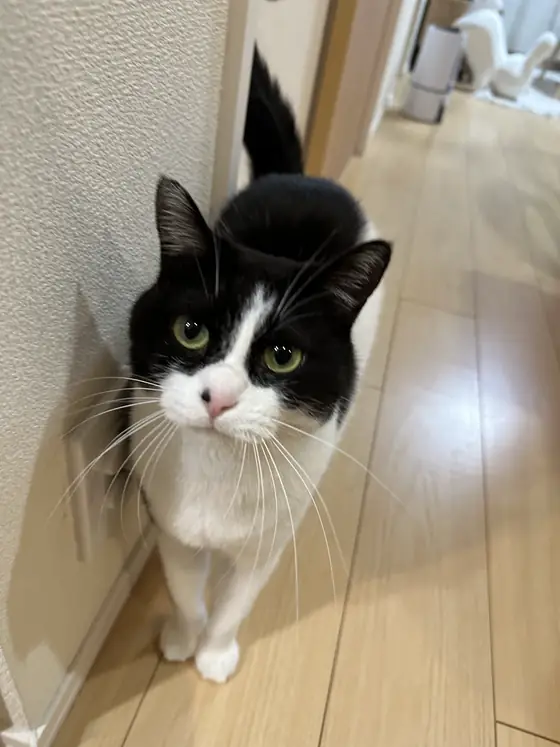
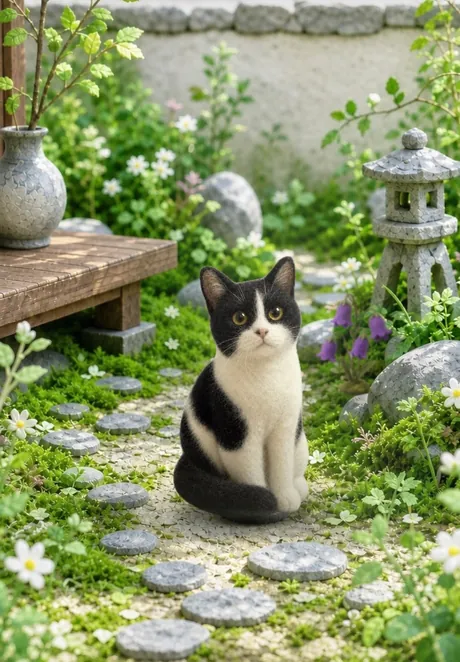
Because the images are generated by AI, results differ from photo to photo.
01 / Prepare a photo
An original photo where your cat is clearly visible.
To capture what makes your cat yours, start with a photo that shows the face and coat pattern. The app also checks the photo before it is sent.
- Choose an original photo taken with a camera. Screenshots and downsized images sent to you may be too small.
- Choose a photo where your cat appears large. Aim for about a third of the frame, and avoid photos taken from too far away.
- Choose a photo of just your cat, with no people in it. Use photos you have the right to use, such as ones you took yourself.
If the photo can’t be checked, you can choose another photo by following the guidance shown in the app.
02 / Welcome your cat in the app
See the results before you welcome your cat.
Choose a photo from “My Cat”
Open the “My Cat” guide in Neko no Niwa and go on to “Choose a Photo.”
Confirm sending the photo
To generate the felt-style figure, the photo is sent to OpenAI’s image generation API. Read the explanation shown before sending, and continue if you agree. You can write features you want to convey, such as the coat pattern or eye color, in “Special notes.”
Choose from the candidates
Look at the three generated candidates and choose the one that looks most like your cat. Checking the candidates is free. If you don’t like them, you can stop without buying a welcome.
Check the price and welcome your cat to the garden
When you welcome the cat you chose into the garden, you go on to the in-app purchase. Please check the price on the purchase screen before confirming. After your cat is welcomed, more poses will arrive little by little.
03 / About the cost
What’s free, and what’s paid.
Free
Downloading the app and checking the candidates generated from your photo.
In-app purchase
Welcoming the candidate you like into the garden as “My Cat.”
The actual price is shown on the purchase screen in the app. Please check it before confirming your purchase. Free generation isn’t unlimited; retries and similar actions have usage limits.
04 / FAQ
Things to know before you welcome your cat.
Will it look exactly like the photo?
AI generates a needle-felt style figure based on features such as the coat pattern and eye color. An exact reproduction of the photo isn’t guaranteed. Check the candidates before you buy, and choose the one you like.
How is my photo handled?
The photo you choose is sent for generation. The original photo is deleted from the server once the generated result is confirmed, and the generated images are stored so that we can keep delivering your “My Cat.” For details, see the Privacy Policy.
How long does it take?
Generation takes some time. It varies with your connection and how busy the service is, so please check the progress shown in the app. Additional poses arrive one by one after your cat is welcomed.
Is this just an app for making cat pictures?
Neko no Niwa is an app for enjoying cats and the changes in a little garden. Steps come from Health, and you can also put the garden widget on your Home Screen. There is also a setting to show only your own cats in the garden.
From an everyday photo,
your garden days begin.
Start by choosing one photo that looks just like your cat.
Checking the candidates is free. Welcoming your cat is an in-app purchase.
See more of what Neko no Niwa can do →